
Product photography has historically been one of the biggest bottlenecks for e-commerce sellers. A single professional photoshoot can cost anywhere from $50 to $500 per session, with additional per-image editing fees of $15–$50. For a store with 100+ SKUs, that adds up to thousands of dollars — and weeks of waiting.
In 2026, AI product photography tools have reached a tipping point. Platforms like PhotoRoom, Claid.ai, and Flair.ai can now produce output that's virtually indistinguishable from traditional studio photography — at a fraction of the cost and time.
We spent weeks testing 12 leading AI product photography platforms across three criteria: image quality, speed and ease of use, and value for money. Here's our complete breakdown.
Why Use AI for Product Photography in 2026?
The shift to AI product photography isn't just about saving money — it's about speed, scale, and creative flexibility that traditional photography simply can't match.
- Cost savings of 90%+. Where a traditional studio shoot costs $200–$500 for a batch of product images, AI tools generate the same output for $0–$35/month. (Source: PixelPanda AI)
- Minutes, not days. Upload a product photo, choose a background or scene, and get a polished image in under 30 seconds. Traditional workflows involve scheduling shoots, shipping products, and waiting for retouching.
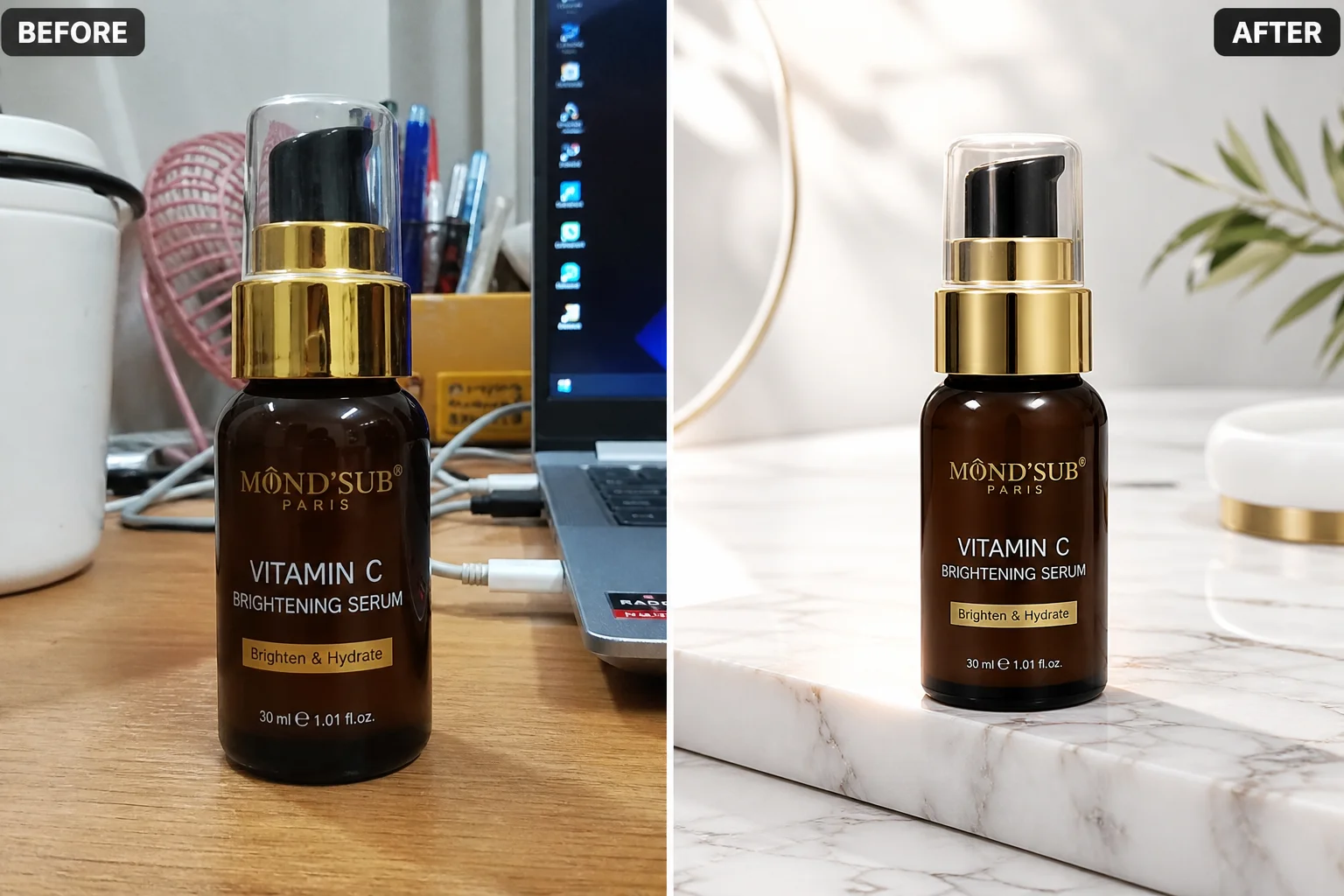
- Infinite scene variety. Generate your product in dozens of environments — marble countertops, beach sunsets, neon-lit studios — from a single base photo.
- Marketplace compliance built in. Tools like Claid.ai and PhotoRoom automatically format images to Amazon, Shopify, and Etsy specifications, including resolution, aspect ratio, and background requirements.
- Batch processing at scale. Enterprise tools can process thousands of product images per hour, something no traditional studio can match.
According to industry analysis from Digital Applied, Claid, PhotoRoom, Flair, and Pebblely lead the market on quality, speed, and pricing in 2026. (Source: Digital Applied)
Top 12 AI Product Photography Tools Compared
Below, we review each tool in detail. Here's a quick reference of the platforms we tested:
| Tool | Best For | Starting Price | Our Rating |
|---|---|---|---|
| PhotoRoom | E-commerce sellers | Free / $9.99/mo | ★★★★★ 4.8 |
| Claid.ai | Enterprise & marketplaces | Custom pricing | ★★★★★ 4.7 |
| Flair.ai | Lifestyle & creative scenes | Free / $39/mo | ★★★★☆ 4.5 |
| Pebblely | Social media content | Free / $19/mo | ★★★★☆ 4.4 |
| Pixelcut | Free option | Free | ★★★★☆ 4.3 |
| Kive AI | Brand visual identity | Custom pricing | ★★★★☆ 4.3 |
| Canva AI | Design integration | Free / $15/mo | ★★★★☆ 4.2 |
| Fotor | All-in-one editing | Free / $8.99/mo | ★★★☆☆ 4.0 |
| PhotoGPT.io | No-signup quick shots | Free trial | ★★★☆☆ 3.9 |
| ProductAI.photo | Template-based shots | $19/mo | ★★★☆☆ 3.8 |
| Clipdrop | Background & lighting | Free / $9.99/mo | ★★★☆☆ 3.8 |
| Colabz AI | Budget-friendly option | Free / $9/mo | ★★★☆☆ 3.7 |
PhotoRoom — Best Overall for E-commerce Sellers
Best Overall PhotoRoom
Pricing: Free tier · Pro $9.99/mo · Business $19.99/mo · Enterprise custom (photoroom.com/pricing)
PhotoRoom is the Swiss Army knife of AI product photography. It combines best-in-class background removal with AI-generated backgrounds, batch processing, and mobile apps that make it equally powerful on desktop and phone.
What sets PhotoRoom apart is its deep understanding of e-commerce workflows. The platform offers pre-built templates optimized for Amazon, eBay, Etsy, and Shopify listings, each conforming to the respective marketplace's image requirements. Its AI background generation uses scene-aware composition that positions products naturally within generated environments.
- AI background removal & generation
- Batch processing (up to 100 images)
- Marketplace-specific templates
- iOS & Android apps
- Shadow & reflection generation
- API for automation
Who it's for: Solo sellers, small e-commerce teams, and anyone who needs consistent, marketplace-ready product images at scale. (Source: TechSifted 2026 roundup)
Claid.ai — Best for Enterprise & Marketplaces
Enterprise Claid.ai
Pricing: Custom (contact sales) · Built by Let's Enhance (claid.ai)
Claid.ai (by Let's Enhance) is the heavy hitter of the group. It's designed for online marketplaces and large e-commerce brands that process thousands of product images daily. The platform can upscale images up to 559 megapixels while maintaining quality, and its API-first architecture makes it easy to integrate into existing e-commerce pipelines. (Source: Comparateur IA review)
The tool excels at automated image enhancement — lighting correction, color uniformity, background consistency across product catalogs — making it ideal for brands that need visual cohesion across hundreds or thousands of SKUs.
- Upscaling up to 559 megapixels
- REST API for pipeline integration
- Automated lighting & color correction
- Background generation & removal
- Marketplace format compliance
- Enterprise SLAs
Who it's for: Marketplaces, large e-commerce brands, and agencies managing multi-client catalogs. (Source: AI Cloud Base review)
Flair.ai — Best for Lifestyle & Creative Scenes
Creative Flair.ai
Pricing: Free tier · Paid from $39/mo (flair.ai)
Flair.ai is the artist of the group. Its drag-and-drop AI editor lets you place products into rich, creative scenes — think of it as a virtual photo studio where you control props, lighting, angles, and mood. The results often look like they came from a professional brand photoshoot.
Unlike tools that simply swap backgrounds, Flair.ai generates complete scene compositions with realistic shadows, reflections, and environmental interactions. This makes it the top choice for lifestyle product photography and brand campaigns where atmosphere matters. (Source: Colabz AI comparison)
- Drag-and-drop scene editor
- Realistic shadow & reflection
- Custom prop library
- Brand style templates
- High-resolution output
- Team collaboration
Who it's for: DTC brands, creative agencies, and any seller who wants lifestyle-quality imagery rather than basic white-background shots.
Pebblely — Best for Quick Social Media Content
Pebblely
Pricing: Free tier · Paid from $19/mo (pebblely.com)
Pebblely specializes in speed and simplicity. Upload a product photo, pick from curated AI backgrounds, and download ready-to-post images in under a minute. It's particularly strong for Instagram, TikTok, and Pinterest content where visual variety drives engagement.
The platform lets you customize product rotation and sizing within generated scenes, and its background themes are updated regularly to reflect seasonal trends. (Source: Fibbl best tools roundup)
- One-click background generation
- Social media size presets
- Seasonal theme library
- Product rotation & sizing
- Instagram-optimized output
- Quick batch mode
Who it's for: Social media managers, DTC brands running paid social campaigns, and sellers who need fresh visual content daily.
Pixelcut — Best Free Option
Best Free Pixelcut
Pricing: Free (with paid Pro option) · 100M+ images processed monthly (pixelcut.ai)
Pixelcut (which briefly rebranded to Pixa before reverting) is the most generous free option on our list. Its free tier includes background removal, AI backgrounds, and basic editing tools — no watermark required. The platform serves over 15 million users monthly and processes more than 100 million images. (Source: Complete AI Training)
The free AI photo remover and upscaler are particularly valuable for sellers just starting out who need professional-looking images without any investment.
- Free background remover
- Free AI image upscaler
- No watermark on free tier
- Mobile app (iOS & Android)
- Batch editing
- 15M+ active users
Who it's for: Budget-conscious sellers, side-hustle entrepreneurs, and anyone testing AI product photography for the first time.
Kive AI — Best for Brand Visual Identity
Brand Kive AI
Pricing: Custom (contact sales) (kive.ai)
Kive AI takes a different approach. Rather than just generating product photos, it's an all-in-one visual asset platform that combines generation, management, and brand identity tools. Founded in Stockholm, it's designed for consumer brands that need consistent visual language across all touchpoints. (Source: AIPure Kive review)
Its "live creation environment" lets teams build product shots that match existing brand guidelines, making it ideal for established brands expanding into new product lines.
- Brand style enforcement
- Asset management built-in
- Team collaboration
- Visual mood boards
- AI-powered generation
- Enterprise security
Who it's for: Established consumer brands, marketing teams, and agencies managing brand visual identity across multiple products and channels.
Other Notable AI Product Photography Tools
Canva AI — Best for Design Integration
Canva's AI product photo features integrate seamlessly with its design ecosystem. If you already use Canva for social media graphics, marketing materials, or presentations, its AI background and product photo tools are a natural extension. Pricing starts at $15/month for Pro. (Source: Colabz comparison)
Fotor — Best All-in-One Editor
Fotor combines AI product photography with a full-featured photo editor, making it suitable for sellers who need both product shots and general image editing. Its AI vibe marketing platform turns single photos into high-end imagery. Plans from $8.99/month. (Source: ZizzleUp guide)
PhotoGPT.io — Best No-Signup Tool
PhotoGPT.io lets you create AI product photos without creating an account. Upload, generate, download — it's that simple. Great for quick tests and one-off images. Offers both white-background shots for Amazon and creative lifestyle scenes. (Source: photogpt.io)
ProductAI.photo — Best Template-Based
ProductAI.photo offers a curated library of professional templates. Upload your product, pick a template, and download a ready-to-post photo. Particularly useful for sellers who want consistent styling across their catalog. Plans from $19/month. (Source: productai.photo)
Clipdrop — Best for Background & Lighting
Developed by Init ML (now part of Stability AI), Clipdrop offers powerful AI-powered image editing including background removal, cleanup, and lighting adjustment. It's more of an editing toolkit than a dedicated product photography platform, but its quality is excellent for enhancing existing product photos. (Source: ShotKit tutorial)
Colabz AI — Best Budget-Friendly Option
Colabz AI is a newer entrant that offers competitive features at a lower price point. Plans start at $9/month, making it one of the most affordable dedicated product photography tools. It's particularly strong for small sellers and startups testing the waters. (Source: Colabz self-review)
Comparison Table: Features, Pricing & Ratings
| Feature | PhotoRoom | Claid.ai | Flair.ai | Pebblely | Pixelcut | Kive AI |
|---|---|---|---|---|---|---|
| Background Removal | ✓ Best | ✓ | ✓ | ✓ | ✓ Free | ✓ |
| AI Scene Generation | ✓ | ✓ | ✓ Best | ✓ | ✓ | ✓ |
| Batch Processing | 100 imgs | Unlimited | Limited | ✓ | ✓ | ✓ |
| API Access | ✓ | ✓ Best | — | — | — | ✓ |
| Mobile App | ✓ Best | — | — | — | ✓ | — |
| Free Tier | ✓ | Trial | ✓ | ✓ | ✓ Best | Trial |
| Upscaling | — | 559MP | — | — | ✓ | — |
| Starting Price | $9.99/mo | Custom | $39/mo | $19/mo | Free | Custom |
| Overall | 4.8 | 4.7 | 4.5 | 4.4 | 4.3 | 4.3 |
How to Choose the Right AI Photography Tool
With so many options, how do you pick the right tool for your needs? Here's our decision framework:
For Amazon Sellers
Amazon requires pure white backgrounds, specific dimensions (at least 1000px on the longest side for zoom), and strict quality standards. PhotoRoom and Claid.ai both offer Amazon-compliant templates and auto-formatting. PhotoRoom's white background removal is the most precise in the industry, while Claid.ai's upscaling ensures your images meet the 1000px minimum even if your source photo is small.
For Shopify Store Owners
Shopify gives you more creative freedom. You can use lifestyle backgrounds, artistic compositions, and varied aspect ratios. Flair.ai excels here with its drag-and-drop scene editor, while PhotoRoom offers the best balance of speed and quality for high-volume catalogs. For sellers building a new store, pairing these tools with one of the best AI website builders for small business can streamline your entire launch workflow.
For Etsy Sellers
Etsy shoppers respond to authentic, lifestyle-oriented imagery. Pebblely and Flair.ai are ideal for creating the warm, contextual scenes that resonate with Etsy's audience. The ability to quickly generate multiple scene variations for A/B testing is a significant advantage.
For Enterprise & Agencies
If you're managing catalogs of 1,000+ products or serving multiple clients, Claid.ai's API-first approach and Kive AI's brand management capabilities are purpose-built for scale. Both support automated pipelines, custom styling rules, and enterprise-grade SLAs.
For Budget-Conscious Sellers
If you're just starting or working with a tight budget, Pixelcut offers the best free tier with no watermarks, and PhotoGPT.io requires no account at all. Both can produce quality results for basic product listings.

FAQ: AI Product Photography
Can I use AI-generated product photos on Amazon?
Yes. Amazon allows AI-generated product photos as long as the product is accurately represented. Background changes, lighting adjustments, and AI-generated scenes are permitted. However, Amazon prohibits AI alterations that misrepresent the product's actual appearance, size, color, or features. Always ensure the product itself — not just the background — is the real item you're selling.
Is AI product photography legal for commercial use?
Yes. All major AI product photography platforms — PhotoRoom, Claid.ai, Flair.ai, Pebblely, and Pixelcut — grant commercial usage rights for images generated on their platforms. Always verify the specific terms of service, but commercial use for e-commerce listings, social media, and advertising is standard across the industry.
How much can I save using AI product photography vs traditional photography?
Traditional product photography costs $50–$500 per session plus $15–$50 per edited image. AI tools range from free to $35/month for unlimited or high-volume output. For a store with 100+ products, AI tools typically save $2,000–$10,000+ annually on photography costs alone. (Source: PixelPanda AI, E-Commerce Paradise)
What is the best free AI product photography tool?
Pixelcut offers the best free tier with background removal, AI backgrounds, and basic editing tools — no watermark required. PhotoRoom also has a capable free plan (watermarked). For completely free, no-signup options, PhotoGPT.io lets you generate basic product photos without creating an account.
Can AI replace product photographers entirely?
For standard e-commerce product shots, white-background listings, and social media content, AI tools handle 80–90% of typical needs. However, traditional photographers still excel at capturing unique textures, complex product interactions, and high-end brand campaigns. Most successful sellers use a hybrid approach: AI for routine catalog work and photographers for hero imagery and brand campaigns.
Does AI product photography work for all product types?
AI product photography works best for solid, well-defined products like electronics, cosmetics, apparel, home goods, and accessories. It's less effective for highly reflective products (mirrors, chrome), extremely complex textures (woven fabrics close-up), or products that require demonstrating scale through human interaction. For challenging products, tools like Claid.ai offer advanced upscaling and enhancement that can handle more complex scenarios.
Ready to Transform Your Product Photography?
Start with PhotoRoom's free tier to test the quality, then scale with a paid plan as your catalog grows. For enterprise needs, Claid.ai offers the most robust API and batch processing capabilities.
Last updated: May 24, 2026 · Written by the FindAI Trends team · Sources: PhotoRoom, Claid.ai, Flair.ai, Pebblely, Pixelcut, Kive AI, and industry analysis