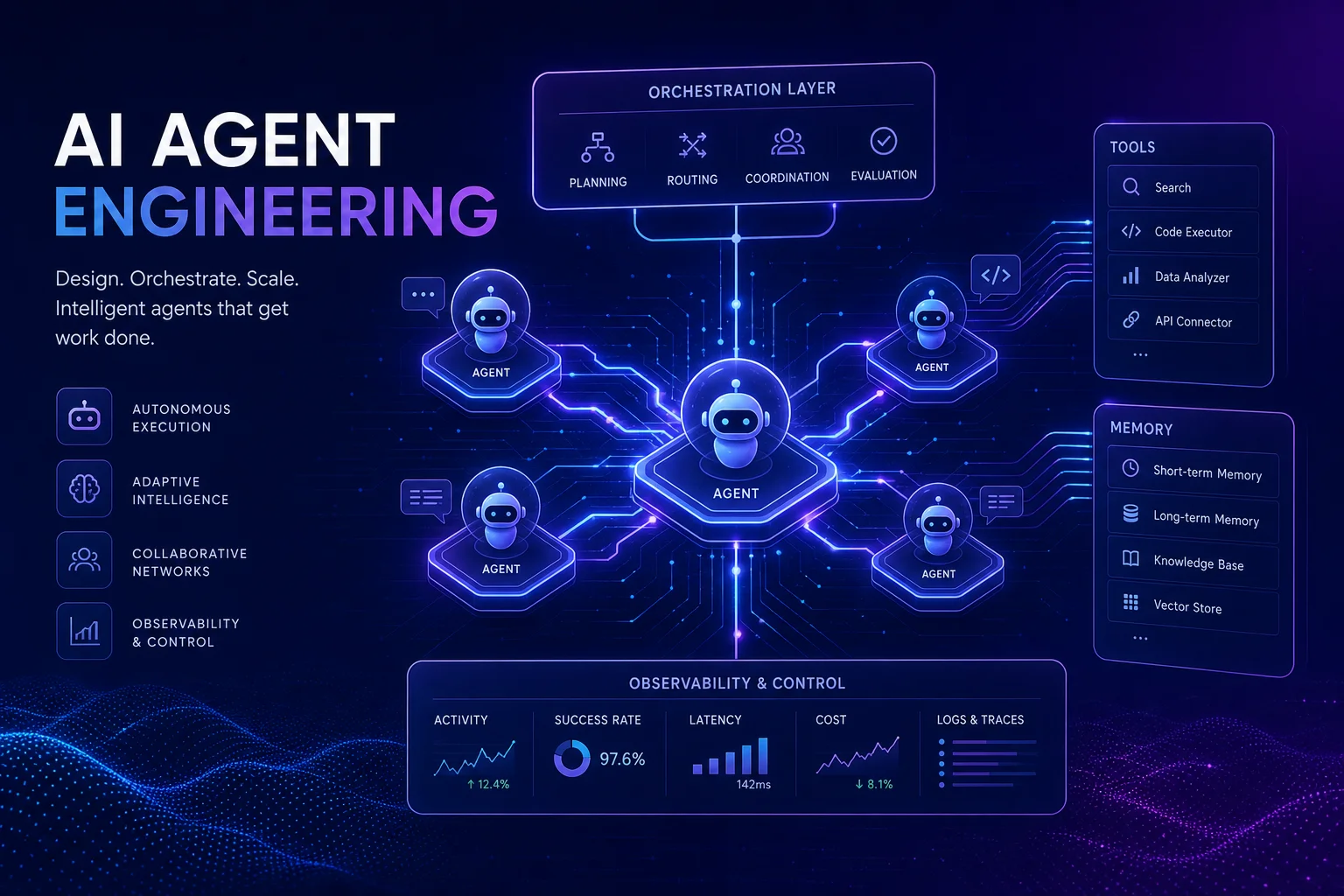
Building production-ready AI agents is no longer about stitching together API calls and hoping for the best. The discipline of AI agent harness engineering — the systematic design of frameworks that give LLM-powered agents structure, memory, tool access, and evaluation — has emerged as one of the most critical skills in the 2026 AI stack.
Whether you're building a single-task assistant or a multi-agent orchestration system, the questions are the same: Which framework gives you the right balance of control and simplicity? How do you give agents persistent memory without blowing your token budget? And most importantly, how do you know your agent works reliably before it touches production traffic?
This guide answers all three. We compare the four leading AI agent frameworks — LangGraph, CrewAI, AutoGen, and the OpenAI Agents SDK — across architecture, memory patterns, evaluation tooling, and orchestration capabilities. By the end, you'll have a decision framework for choosing the right harness for your use case.
What Is AI Agent Harness Engineering?
An agent harness is the scaffolding around an LLM that transforms it from a stateless text generator into a goal-directed, tool-using, memory-equipped system. Think of it as the difference between a raw engine and a complete car: the LLM provides the horsepower, but the harness provides the steering, brakes, navigation, and fuel management.
At minimum, a production agent harness includes four layers:
- Control Flow: How the agent decides what to do next — sequential chains, state machines, or graph-based routing.
- Memory: Short-term context management, long-term knowledge storage, and episodic recall of past interactions.
- Tool Integration: Function calling, API access, code execution, and external service integration.
- Evaluation & Observability: Testing frameworks, tracing, logging, and AI agent observability and logging for production monitoring.
The choice of framework determines how each of these layers is implemented and how they interact. Let's examine the leading options.
Top AI Agent Frameworks Compared
1. LangGraph — Fine-Grained State Machine Control
LangGraph LangChain Ecosystem
LangGraph extends LangChain with a graph-based execution model where each node represents a step in your agent's reasoning process. Unlike linear chains, LangGraph's directed graphs support cycles — enabling agents to loop, retry, and revise their approach until a goal is reached.
The key differentiator is explicit state management. Every node receives and returns a typed state object, giving you full visibility into what the agent "knows" at each step. This is invaluable for debugging complex multi-step workflows.
Pros
- Full control over agent state and transitions
- Built-in checkpointing for persistence (Source)
- Human-in-the-loop support out of the box
- Integrates seamlessly with LangSmith for tracing
- Large community and enterprise backing (LangChain Inc.)
Cons
- Steeper learning curve than simpler frameworks
- Graph definition can become verbose for complex agents
- Tied to the LangChain ecosystem
Best for: Engineers who need fine-grained control over agent behavior, stateful workflows, and production-grade debugging capabilities.
2. CrewAI — Role-Based Multi-Agent Collaboration
CrewAI Multi-Agent
CrewAI takes a fundamentally different approach: instead of one agent with many tools, it models teams of specialized agents, each with defined roles, goals, and backstories. A "Crew" coordinates these agents through sequential or hierarchical processes.
The role-based abstraction maps naturally to real-world workflows. A research crew might include a Researcher agent, an Analyst agent, and a Writer agent — each operating within its domain of expertise while sharing context through the crew's task system.
Pros
- Intuitive role-based abstraction
- Built-in task delegation and coordination
- Supports multiple LLM providers
- Active open-source community
Cons
- Less granular control over individual agent behavior
- Task handoff between agents can lose context
- Emerging ecosystem compared to LangChain
Best for: Teams building collaborative multi-agent systems where role specialization and task delegation mirror real organizational structures.
3. AutoGen — Microsoft's Conversational Multi-Agent Framework
AutoGen Microsoft Research
AutoGen from Microsoft Research introduces a conversational programming model where agents communicate through message passing. The framework supports a wide range of conversation patterns: one-to-one, group chats, and nested conversations with human participants.
AutoGen's standout feature is its flexibility in agent topology. You can create a code-execution agent that converses with a planning agent, which in turn coordinates with a documentation agent — all through structured message passing. The framework also includes built-in code execution sandboxing.
Pros
- Flexible conversation-based architecture
- Strong code execution capabilities with sandboxing
- Backed by Microsoft Research
- Supports diverse LLM backends
Cons
- Conversation flows can be hard to debug
- Less prescriptive — requires more architecture decisions
- Documentation lagging behind features
Best for: Research and development teams exploring novel multi-agent interaction patterns, especially those already invested in the Microsoft ecosystem.
4. OpenAI Agents SDK — Native OpenAI Integration
OpenAI Agents SDK OpenAI Official
OpenAI's official Agents SDK provides a first-class integration with the OpenAI model ecosystem, including GPT-4o, o-series reasoning models, and the Responses API. It implements the Agent-to-Agent (A2A) protocol for interoperable multi-agent communication.
The SDK's strength is its deep integration with OpenAI's tool ecosystem: Code Interpreter, file search, web search, and computer use are all available as built-in tools. The handoff protocol between agents is clean and type-safe, making it straightforward to build agent networks.
Pros
- Native access to OpenAI's full tool suite
- Clean handoff protocol between agents
- Type-safe agent definitions with Pydantic
- Guardrails and input validation built in
- A2A protocol support for interoperability
Cons
- Primarily optimized for OpenAI models
- Relatively new — still evolving rapidly
- Vendor lock-in risk for non-OpenAI stacks
Best for: Teams building on the OpenAI platform who want the most integrated, lowest-friction path from model to agent.
Head-to-Head Comparison
| Feature | LangGraph | CrewAI | AutoGen | OpenAI Agents SDK |
|---|---|---|---|---|
| Architecture | State graph | Role-based crew | Conversation graph | Agent network |
| Multi-Agent | ✔ Manual orchestration | ✔ Native | ✔ Native | ✔ Handoff protocol |
| State Management | ✔ Typed & explicit | Task-based | Message history | ✔ Type-safe |
| Memory Layer | Via LangGraph Memory | Via task context | Via message history | Via agent state |
| Human-in-the-Loop | ✔ Built-in | Limited | ✔ Supported | ✔ Guardrails |
| Evaluation Tools | LangSmith | Community tools | Custom evals | OpenAI evals |
| LLM Agnostic | ✔ | ✔ | ✔ | ✘ OpenAI-focused |
| Learning Curve | Moderate-High | Low-Moderate | Moderate-High | Low-Moderate |
Memory Systems: Short-Term, Long-Term & RAG Integration
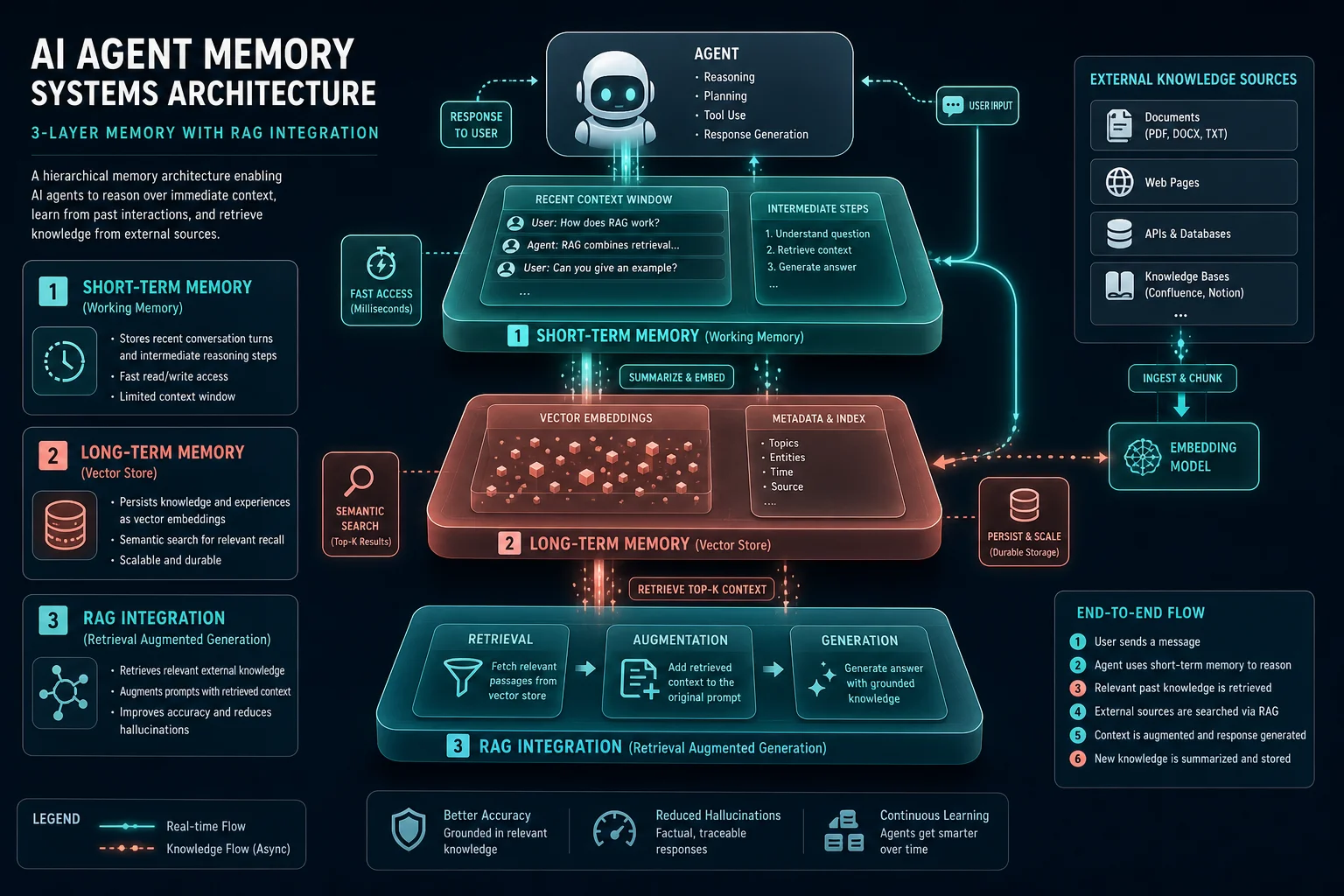
Memory is the most misunderstood component of AI agent design. Most tutorials treat it as "just use a vector database," but production systems require a tiered memory architecture with different storage strategies for different recall patterns.
Short-Term Memory: The Context Window
Short-term memory is everything the agent holds in its current context window. This includes the system prompt, recent conversation history, active task state, and tool results. The challenge is that context windows are finite — even GPT-4o's 128K context has practical limits for cost and latency.
Best practices:
- Use summarization to compress older conversation turns (LangGraph's summarization node pattern)
- Implement sliding windows that keep only the most recent N turns verbatim
- Store key decisions and outcomes as structured metadata rather than raw text
Long-Term Memory: Vector Stores & Knowledge Graphs
Long-term memory persists across sessions and enables the agent to "remember" information from previous interactions. The dominant approach combines vector databases (Pinecone, Weaviate, Qdrant) with embedding models for semantic retrieval.
Emerging solutions like Mem0 (mem0.ai) provide a dedicated AI memory layer that automatically extracts, stores, and retrieves relevant facts without manual embedding management. This is particularly valuable for personalized agents that adapt to individual users over time.
RAG Integration: Grounding Agents in External Knowledge
Retrieval-Augmented Generation (RAG) gives agents access to domain-specific knowledge without retraining. The key design decisions are:
- Chunking strategy: Semantic chunking (by topic boundary) outperforms fixed-size chunking for most agent use cases (LlamaIndex documentation)
- Retrieval strategy: Hybrid search (BM25 + dense vector) consistently outperforms pure vector search, especially for technical queries
- Re-ranking: A lightweight re-ranker (CrossEncoder or Cohere Rerank) on the top-20 results before LLM consumption improves answer quality measurably
Evaluation Frameworks: How to Test & Benchmark AI Agents
You wouldn't ship a microservice without unit tests. The same rigor applies to AI agents — but the evaluation surface is fundamentally different because agents are non-deterministic and multi-step.
Evaluation Dimensions
| Dimension | What It Tests | Tools |
|---|---|---|
| Answer Correctness | Does the agent produce factually accurate responses? | Ragas, DeepEval, G-Eval |
| Tool Selection | Does the agent call the right tool at the right time? | LangSmith traces, custom evals |
| Plan Quality | Does the agent decompose complex tasks effectively? | AgentBench, custom rubrics |
| Robustness | How does the agent handle edge cases and adversarial inputs? | Promptfoo, DeepEval |
| Latency & Cost | What are the operational characteristics? | LangSmith, Arize Phoenix |
Ragas (docs.ragas.io) is the most widely adopted open-source evaluation framework for RAG-based agents. It measures faithfulness (are claims grounded in retrieved context?), answer relevance (does the answer address the question?), and context precision (is the retrieved context actually useful?).
DeepEval (docs.confident-ai.com) by Confident AI provides a pytest-like testing experience for LLM applications. You write test cases with expected outcomes, and DeepEval evaluates them using LLM-as-a-judge metrics. Its bias detection and toxicity checks are particularly valuable for production safety gates.
AgentBench provides a standardized benchmark suite for evaluating agent capabilities across multiple domains including database interaction, knowledge retrieval, and web navigation. It's particularly useful for comparing different agent architectures on the same tasks.
Orchestration Patterns for Multi-Agent Systems
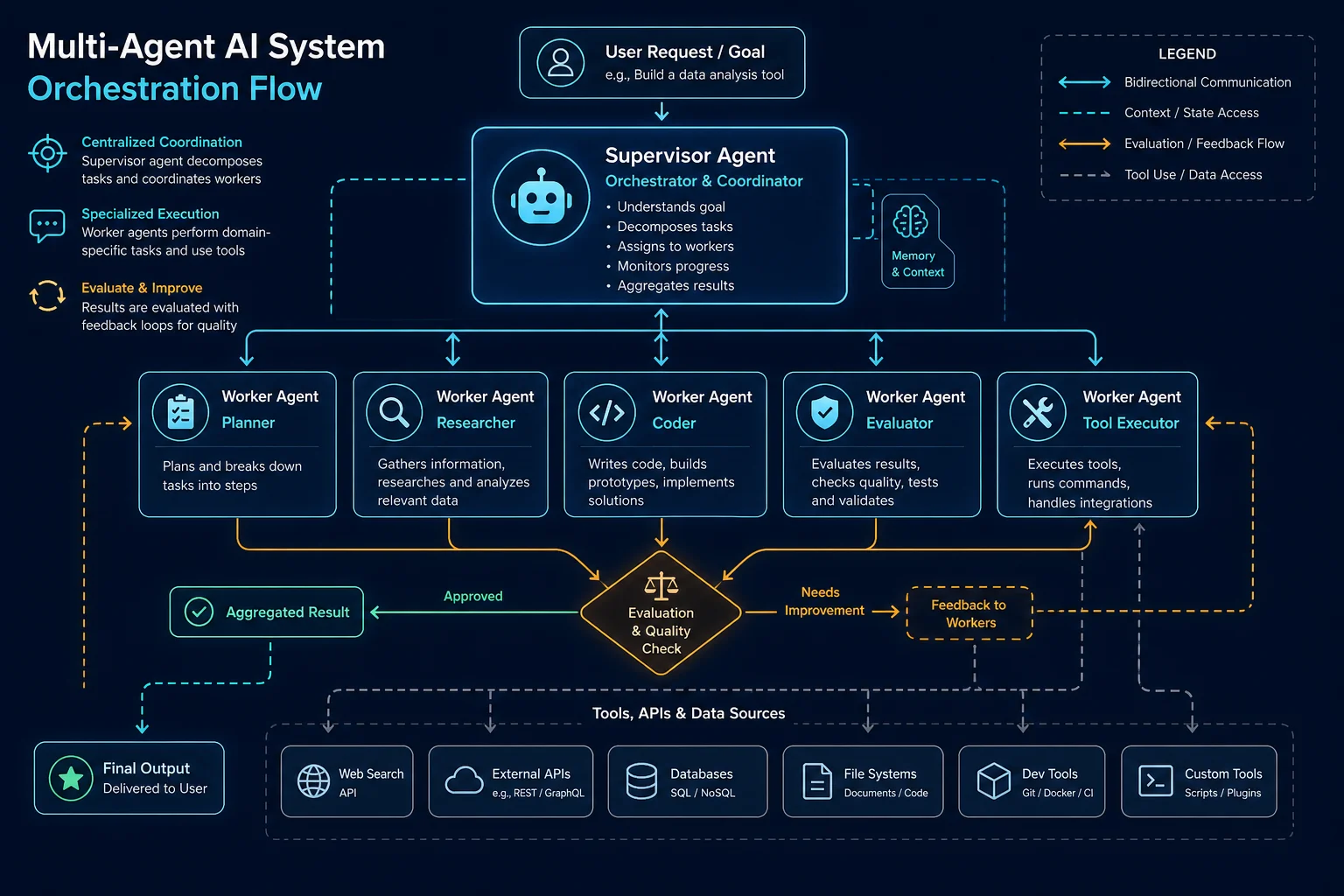
When a single agent isn't enough, multi-agent orchestration patterns emerge. Each pattern suits different workload characteristics:
Pattern 1: Supervisor-Worker
A central supervisor agent decomposes tasks and delegates to specialized workers. The supervisor reviews worker outputs, synthesizes results, and decides whether to iterate or finalize. This is the most common pattern in production and maps well to LangGraph's state machine model.
Pattern 2: Sequential Pipeline
Agents operate in a fixed sequence, each adding a layer of processing. Common in content generation pipelines: Research → Draft → Edit → Fact-Check → Format. CrewAI's sequential process mode implements this natively.
Pattern 3: Hierarchical Teams
Teams of agents, each with their own supervisor, coordinate at a higher level. This mirrors organizational structure and scales well for complex domains. AutoGen's group chat manager supports this pattern through nested conversation groups.
Pattern 4: Consensus Voting
Multiple agents independently solve the same problem, and a voting mechanism selects the best answer. Useful for high-stakes decisions where a single agent's failure mode is unacceptable. Pattern popularized by research on self-consistency in LLM reasoning.
Tool Use & Function Calling Best Practices
Tool use is what separates agents from chatbots. The AI agent tool use patterns you choose determine whether your agent is a helpful assistant or a dangerous loose cannon.
Tool Design Principles
- Granularity: Each tool should do one thing well. A "search_database" tool is better than a "do_everything_with_data" tool because the LLM can more reliably select and invoke it.
- Input validation: Validate tool inputs before execution. The LLM will sometimes generate malformed arguments — catch these before they reach your API.
- Error recovery: Tools should return structured error messages the agent can understand and act on. A bare 500 error teaches the agent nothing; a "rate limit exceeded, retry after 30s" message enables intelligent retry.
- Observability: Log every tool call with its inputs, outputs, and latency. LangSmith and Arize Phoenix both provide tool-call tracing out of the box.
Safe Tool Execution
For agents that execute code or make API calls with real-world consequences, implement permission gates: read-only operations execute automatically, but write/delete operations require human approval. This pattern is critical for building production AI agents that interact with customer data or financial systems.
Building Production-Ready Agent Architectures
Moving from prototype to production requires architectural decisions that don't matter in a Jupyter notebook but become critical at scale:
1. State Persistence
Every production agent needs a checkpoint backend. LangGraph supports PostgreSQL, SQLite, and Redis as checkpoint stores. For multi-tenant systems, namespace checkpoints by user ID to maintain isolation.
2. Concurrency & Queueing
Agents are I/O-bound and benefit from async execution. Use a task queue (Celery, Redis Queue, or your cloud provider's queue service) to handle burst traffic. The agent harness should be stateless from the queue's perspective — all state lives in the checkpoint store.
3. Rate Limiting & Cost Control
Implement token budget limits per session and per day. Track cost attribution by agent, user, and feature. Tools like Arize Phoenix can help with cost monitoring and anomaly detection.
4. Fallback & Degradation
Design for LLM provider outages. Maintain a fallback to a smaller/cheaper model for non-critical paths. Implement circuit breakers that detect when an agent is stuck in a retry loop and escalate to human operators.
5. [AI coding assistants for agent development](https://findaitrends.com/ai-coding-assistants-2026) Integration
Use AI coding assistants for agent development to rapidly prototype and iterate on agent architectures. Tools like Cursor and Claude Code can help generate boilerplate harness code, test suites, and evaluation scripts.
Case Studies & Real-World Implementations
Case Study: Customer Support Agent at Scale
A mid-size SaaS company replaced tier-1 support with a LangGraph-based agent harness. The architecture uses:
- Supervisor agent that classifies intent and routes to specialists
- Knowledge retrieval agent with RAG over 50K+ support articles
- Action agent with tools for account lookup, password reset, and ticket creation
- Evaluation agent that scores every response for accuracy before sending to the customer
Result: 73% of tier-1 tickets resolved without human intervention, with a 4.2/5 customer satisfaction score — up from 3.8 with the previous rule-based system.
Case Study: Research Pipeline with CrewAI
A market research firm uses CrewAI to automate competitive intelligence reports. Their crew consists of:
- Web Researcher — searches and scrapes competitor websites and news
- Data Analyst — extracts pricing, features, and positioning data
- Synthesis Writer — generates structured competitive analysis
- Fact Checker — validates claims against source URLs
Result: Report generation time reduced from 3 days to 4 hours, with consistent quality across all outputs.
Getting Started: Your First Agent Harness
Here's a minimal but complete agent harness using LangGraph that demonstrates state management, tool use, and checkpointing:
from langgraph.graph import StateGraph, MessagesState
from langgraph.checkpoint.memory import MemorySaver
from langchain_openai import ChatOpenAI

# 1. Define the LLM with tool support
llm = ChatOpenAI(model="gpt-4o", temperature=0)

# 2. Define your tools
def get_weather(location: str) -> str:
    """Get current weather for a location."""
    # Real implementation would call a weather API
    return f"Sunny, 72°F in {location}"

tools = [get_weather]
llm_with_tools = llm.bind_tools(tools)

# 3. Define the agent node
def agent_node(state: MessagesState):
    response = llm_with_tools.invoke(state["messages"])
    return {"messages": [response]}

# 4. Define the tool execution node
def tool_node(state: MessagesState):
    last_message = state["messages"][-1]
    # Execute tools called by the LLM
    results = execute_tool_calls(last_message.tool_calls)
    return {"messages": results}

# 5. Build the graph
graph = StateGraph(MessagesState)
graph.add_node("agent", agent_node)
graph.add_node("tools", tool_node)
graph.set_entry_point("agent")
graph.add_conditional_edges("agent", route_message)
graph.add_edge("tools", "agent")

# 6. Add checkpointing for memory persistence
checkpointer = MemorySaver()
app = graph.compile(checkpointer=checkpointer)

# 7. Run the agent
result = app.invoke(
    {"messages": [("user", "What's the weather in Tokyo?")]},
    config={"configurable": {"thread_id": "session-1"}}
)
This harness demonstrates the core pattern: the agent receives state, decides whether to call tools or respond directly, and the graph routes accordingly. The checkpointer persists conversation state so the agent remembers context across turns.
Ready to Build Your Agent Harness?
Start with the framework that matches your team's expertise and use case complexity. All four frameworks we covered are production-ready — the "best" choice depends on your specific requirements.
Compare All Frameworks →Our Verdict
For most production use cases in 2026, we recommend LangGraph as the default choice. Its state machine architecture provides the debugging visibility and control that production systems demand, and the LangChain ecosystem offers the broadest tool integration surface.
Choose CrewAI if your domain naturally maps to role-based teams and you want faster prototyping. Choose AutoGen for research explorations of novel multi-agent patterns. Choose the OpenAI Agents SDK if you're fully committed to the OpenAI ecosystem and want the lowest integration overhead.
Regardless of framework, invest heavily in evaluation infrastructure from day one. An unevaluated agent is a liability, not an asset.
Frequently Asked Questions
AI agent harness engineering is the discipline of designing and implementing the scaffolding around a large language model (LLM) that transforms it from a stateless text generator into a production-ready agent with memory, tool access, decision-making capabilities, and evaluation gates. The "harness" includes control flow architecture, memory systems, tool integrations, and observability infrastructure.
For most production use cases, LangGraph is the recommended choice due to its fine-grained state control, built-in checkpointing, human-in-the-loop support, and LangSmith integration for observability. However, the best framework depends on your specific needs: CrewAI for role-based teams, AutoGen for conversational multi-agent research, and OpenAI Agents SDK for OpenAI-native integrations.
Production AI agents use a tiered memory architecture: short-term memory (context window with summarization and sliding windows), long-term memory (vector databases like Pinecone or dedicated memory layers like Mem0), and episodic memory (checkpointed conversation history). RAG integration grounds agents in external knowledge through semantic retrieval and re-ranking.
AI agent evaluation spans multiple dimensions: answer correctness (using tools like Ragas and DeepEval), tool selection accuracy (via trace analysis), plan quality (through AgentBench or custom rubrics), robustness (adversarial testing with Promptfoo), and operational metrics like latency and cost. LLM-as-a-judge evaluation is the dominant approach for automated quality assessment.
The four primary multi-agent orchestration patterns are: supervisor-worker (central agent delegates to specialists), sequential pipeline (agents process in fixed order), hierarchical teams (nested agent groups), and consensus voting (multiple agents solve independently, best result wins). Each pattern suits different workload characteristics and complexity levels.
Production AI agent costs vary widely based on model choice, tool complexity, and traffic volume. A typical GPT-4o-based agent with 3-5 tool calls per session costs approximately $0.02-$0.08 per interaction. For a system handling 10,000 sessions/day, monthly costs range from $600-$2,400 for API usage alone, plus infrastructure costs for memory stores, monitoring, and hosting.
Related Articles
- Best AI Agent Frameworks 2026 — LangGraph vs CrewAI vs AutoGen vs OpenAI Agents SDK
- AI Agent Observability Best Practices — Logging, Auditing, Trust
- Best AI Coding Assistants 2026 — Cursor, Claude Code, Copilot Compared
Last updated: May 26, 2026. This article is part of our AI Tools Guide series. We research and test AI tools to help you make informed decisions. Affiliate disclosure | About | Contact